This term we have hit the ground running after a few trials late last year of using wikis as an online precence for students and also for class programs.
This year I am team teaching Year 7 & 8 IT classes. I am also currently supporting the development of ICT and higher order thinking skills in three other grade levels, Prep/One, Grade 5/6 and Year 9.
The wikis that we have created so far are all linked through our main wiki for Wedderburn College.
From there teachers and students can link to their class wiki and their own individual wikis. Through the generosity of Wikispaces we have been able to create these wikis as private so that only the student and those that they invite can see it. They will be without advertisements because Wikispaces deems them educational. As an added precaution I have asked students to create their log on and their wikispace with their Cases number which is a series of letters and numbers unique to each student. That also means that if I as a teacher want to see any of them I know the url. It does mean that students have to invite their classroom teachers to be a member of their wikispace but that isn't hard and is a good exercise in itself.
We have decided to call them WikiFolios. I'm not the first one to think of that term. Although I did Google it and came up with only 16 hits in English which is pretty amazing. So maybe I am a bit of a trail blazer after all !!! :)
Friday, February 16, 2007


Tuesday, February 06, 2007
Lost without my Laptop
Now that I am back in Australia after my amazing experience in Korea and in Bangkok I now have time to reflect on what I did. I have the time but not the technology.
when I left Bangkok my laptop, mobile phone and palm pilot got left behind at the hotel. It wasn't loaded into the transit van and I didn't realise until I got to the airport. By then it was too late to get it delivered to the airport.
So in between many many phone calls to Bangkok and to the courier in Australia, I have now been without my laptop for a week.
It has made me realise how much I do depend on it to do my work but also to function in my every day life.
With no laptop I have no address book for my emails, I don't have recent work (although thankfully I did back up important work before I left)
I don't have the regular software that I use in my teaching classes. I can't easily connect to the interactive whiteboard because I have to borrow a laptop.
It seems that everything that I do has added time and organisational things to be done.
It has made me think and reflect on just how much I do depend on it for my every day work.
when I left Bangkok my laptop, mobile phone and palm pilot got left behind at the hotel. It wasn't loaded into the transit van and I didn't realise until I got to the airport. By then it was too late to get it delivered to the airport.
So in between many many phone calls to Bangkok and to the courier in Australia, I have now been without my laptop for a week.
It has made me realise how much I do depend on it to do my work but also to function in my every day life.
With no laptop I have no address book for my emails, I don't have recent work (although thankfully I did back up important work before I left)
I don't have the regular software that I use in my teaching classes. I can't easily connect to the interactive whiteboard because I have to borrow a laptop.
It seems that everything that I do has added time and organisational things to be done.
It has made me think and reflect on just how much I do depend on it for my every day work.
Sunday, January 21, 2007
Everything Korean

I have arrived in Korea and have been here for 4 days now. What an amazing country! I have explored a little bit but really haven't had a lot of time as I have work to do while here as well as some other urgent work for Intel that had to be completed. Nevertheless any spare moment I have taken to check out some of the views and society of Seoul.
Speaking only English provides a real challenge. There seem to be very few people who speak English and even the people in the hotel speak a very limited version of English. So I have spent much of my time communcating in a very limited way by sign language. Taxis are everywhere but again noone speaks english so to get anywhere I have to firstly show the concierge where I would like to go, get him to write it on a Hilton business card and then I show that to the taxi driver and then when I catch one back I show him the card with the Hilton on it. It's not always successful, I got refused in a taxi last night because I was on the wrong side of the street-it seems that they don't want to have to turn around!!!
Of course I can't read any of the shop signs although luckily the street signs and things like the railway and subway stations have both Korean and English sign. But even to write this blog I am looking at Korean characters in the login, the post section etc. As you can see, so it's a bit of a guess which button that I push. Even to tag this page is impossible as it's all in Korean. I'm sure that there's something that I can download but I'll muddle through for now. :)
I saved this post until I got back home because I quite literally couldn't read much of the page because it was in Korean text.
Tuesday, January 09, 2007
Friday, January 05, 2007
Thanks Adrian
 Adrian Bruce is an avid blogger, webcreator and teacher who seems to be going from strength to strength with his website and his teaching ideas that he aggregates under his very comprehensive blog and his amazing website. Adrian continues to share his ideas and stories about the class that he teaches. His work is recognised by other educators all over the world. Just check out his awards page ! Each time I go to his website I seem to see something new. He's certainly prolific and has great teaching and learning ideas, particularly for Primary teachers. Check it out!
I notice that he went to Seoul Korea in 2005 as part of the Microsoft Innovative Teachers Award. Interestingly I'm off to Seoul on the 17th Jan 07 for a training Program in Intel Thinking with Technology. I will be training 30 Master trainers from all over Korea. It will be a very interesting and exciting time and of course I will be blogging about it while I'm over there. But I think I'll email Adrian to check out his experience.
This is one of Adrian's posters that he has created and shared on his website. Thanks Adrian!
Tuesday, December 12, 2006
Cool things that make my life easier

I haven't posted much at all lately. Here in Australia we are coming rapidly to the end of the year and with reports and awards nights and end of year activities, I feel a little guilty even doing a post. But I don't want to lose the momentum either of regularly keeping a log of the things that are happening here at school.
I thought today I would add a little about a really cool little application called Page Flakes which I use as my home page.
I plan to teach my students about it next year because one of the requirements of our students in the Victorian Essential Learnings is they manage and maintain their files and links as well as use applications to create, visualise and communicate. I think that giving them ways to do this through the use of Web 2.0 applications might be a good add on to the more traditional ways that we save and manage work at schools.
Sunday, November 26, 2006
Podcasts and Cool things on Firefox
I listen to a few podcasts driving to and from work and it's often where I get a few good ideas. Commonly it's where I often hear of ways to use the Web or Web 2.0 applications. They are not always about education although many are. I find it's a good use of time as I'm driving along the Calder Highway to and from work
Besides some of the great podcasts that are done by educators such as Chris Betcher who produces The Virtual Staffroom podcast and Dan Schmidt who produces the KidCast podcast, there are also other more general podcasts that inform about more general things.
The one I have found really useful for just finding out about new things coming out on the web is one called Inside the Net. These podcasts have introduced me to things like Delicious, Flickr, wikis, Bloglines and RSS. Each week they seem to come up with something new on the web to talk about. All of which have added a new dimension to my teaching practice.
Another great thing was the introduction to Firefox (which I use as my browser all the time now) and all the cool add ons that you can get from Mozilla.
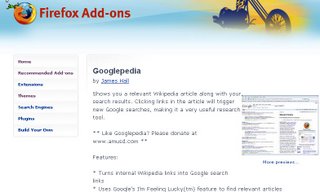 One that I heard about the other day is a little add on called Googlepedia. When you search for something in Google, the add on will also search for the equivalent in Wikipedia and produce it in a split screen. You can click on links within the wikipedia article to create a new Google search as well.
Really cool.
Besides some of the great podcasts that are done by educators such as Chris Betcher who produces The Virtual Staffroom podcast and Dan Schmidt who produces the KidCast podcast, there are also other more general podcasts that inform about more general things.
The one I have found really useful for just finding out about new things coming out on the web is one called Inside the Net. These podcasts have introduced me to things like Delicious, Flickr, wikis, Bloglines and RSS. Each week they seem to come up with something new on the web to talk about. All of which have added a new dimension to my teaching practice.
Another great thing was the introduction to Firefox (which I use as my browser all the time now) and all the cool add ons that you can get from Mozilla.
One that I heard about the other day is a little add on called Googlepedia. When you search for something in Google, the add on will also search for the equivalent in Wikipedia and produce it in a split screen. You can click on links within the wikipedia article to create a new Google search as well.Really cool.
Subscribe to:
Posts (Atom)
 Flickr/annieb3525
 Facebook/Anne Baird
 Twitter/annieb3525
 Del.icio.us/annieb3525
 GMail/Anne Baird
 coComment/annieb3525
 Technorati/annieb3525
 TeachingwithTechnology/annieb3525


 Posts
Posts

