Thursday, January 31, 2008

Google Docs


I love Google Docs. It's such a simple way to collaborate, store, access documents that I have created for school. Particularly when you are collaborating with another teacher in another school, Google docs is a perfect way to share and collaborate when planning and creating units of work. Today I created some class lists with students email addresses and once complete it was only a matter of sharing with the other teachers who teach these students via an email to let them know that they can access and edit the document whenever they need to.
Even better when checking out Jane's eLearning tip of the day, I've discovered a cool little addon that will work with Firefox and Flock that places my Google Docs in a sidebar. With this bar I can drag and drop files that I have already created and stored on my hard drive into a section of the sidebar and they are automatically loaded into my Google Docs account. How cool is that?

Tuesday, January 29, 2008

Learning more about blogging

I came across a new and I think very practical blog written by Sue Waters. Sue is already a reknowned blogger who blogs on Mobile Technology in TAFE. I must admit that I come to Sue's Mobile Technology blog as a late comer but I can already see that it is yet another blog that I will continue to subscribe to. I think I'm going to have to start learning how to read in my sleep!
But I digress. Sue now writes two blogs having just begun a new blog for edublogs. Edublogs is James Farmer's well known and acclaimed site for those in education who love to blog. Sue's new blog is one that she is writing for edublogs called The Edublogger. It seems that Sue has already contemplated the challenge of writing two blogs that might easily be read by the same people. So she has decided that "The Edublogger's posts will be “How To” tips and her Mobile Technology in TAFE will "work through topics on using blogs in an educational context."
Already Sue has created posts on How to create Hyperlinks using HTML, How to add a photo to your sidebar, Adding Widgets to your blog and Tips for doing a blog makeover.
For a while now I have been toying with the idea of taking my blog over to edublogs. Mainly I guess because firstly it's created by a fellow Aussie in James Farmer. And secondly because it is specifically designed for educators. Maybe Sue's posts might just provide the impetus to move to a new home...

Sunday, January 27, 2008

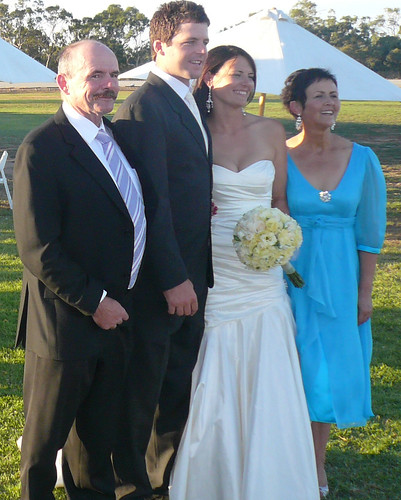
I'm back- with a little personal indulgence.


Matt, Anne, Hannah and Kelvin
Originally uploaded by annieb3525
I can't believe that it's actually been about 5 weeks since I blogged. With blogging and working and creating via the internet being so much part of my life for the last couple of years I do find it strange that, to be honest, I really haven't missed it. I think that actually it's done me good to have a good long break. But I am now looking forward to getting back into it.
It will be interesting how the next few months go. We have our daughter, Hannah's wedding coming up the end of March and much of my time over the past few weeks has been spent talking and thinking and making decisions about the wedding. I think that's been the main reason why I have taken a good long break from blogging. Although on holidays I have had something to keep me very busy and I guess that over the next few weeks it will become busier and busier with juggling school and wedding preparations.
So here is a little personal indulgence- with nothing to do with education and web2.0. But I figure that once in a while I can enjoy being Mother of the Bride. Should be fun :)

Tuesday, December 18, 2007

Creative Commons- who can use my work

Yesterday the students and I worked on an activity using Flickr. I wanted the students to learn a little bit about Flickr and create some fun Christmassy things using Flickr images. There are obviously millions of images posted on Flickr with many beautiful ones tagged Christmas. But there are some of these that have All Rights Reserved and others that have Some Rights Reserved. Then there are others that have No Rights Reserved and lots more in between. So that prompted me to look up exactly what all of these terms really mean. It's something that as teachers we should all have our heads around as we prompt our students to work more and more with so much of the internet. So I checked out this great site Creative Commons.org which basically explains it all and more. It has a wizard that takes you through what rights you want to have and then gives you the exact license you need to post on your work. You can also choose particular rights according to the country you live in. I think that all of us educators out there need to make ourselves very familiar with these issues especially now that so many of our students are both accessing, using and posting on the web. I will certainly be having my Year 7, 8, 9 & 10 students learning more about this next year.

Creative Commons License


This work is licensed under a
Creative Commons Attribution-Noncommercial-Share Alike 2.5 Australia License.

Saturday, December 15, 2007

Plick

I just came across this cool little app called Plick. Very similar to Slideshare, it allows you to upload Powerpoint presentations to the web in order to share them with the world. It then allows you to embedd them into your wiki or blogs etc. Firstly, it enables you to add music or sound to the presentation by mashing the slides and the sound together. You can then download the new presentation as a PPT or a pdf. You can also add notes to each slide so that viewers can get a better idea of your intent. They have also just added the ability to upload presentations created in Google presentation to your Plicks. I still will probably upload most of our presentations to Slideshare as we do have a school account. But it's always worth checking out the competition as there just might be something worth moving for.
If you are interesting in exploring more of these types of applications try Splashcast or Slide .
Another really cool app that I have only played with a little but that I like the look of is RockYou.
I'll check these out a little more tomorrow as I'm working with the students on a web2.0 activity on Tuesday. It's meant to be a bit of fun for the last days of school so I figure I won't have to worry too much about the educational value :)

Saturday, December 08, 2007

Keeping on the straight and narrow

Many of our students have their own wikispace. For some it is their digital portfolio. They create much of the content in class and convert to digital form and upload it to their wikifolio. Some of the younger students create their digital portfolio in powerpoint and all of those students have their own wikispace ( a private one) and are enjoying adding things little by little. Even though all these spaces are private, which means that only those who are invited can see the space, many of the students have invited their friends and teachers to be part of their space. Many of the children also use their wikispace account to email each other.
Yesterday something happened though that scared the living daylights out of me. During lunchtime I was in The Edge ( one of our learning spaces) on computer room duty and one of the Grade 5 students came to me and showed me a couple of messages that she had received through her wiki account. The messages said things like, "I know who you are" and "I'm coming to your house to get you" . Immediately my heart stopped. I thought OMG this child is being stalked or approached by some creep. My first response though was to say that she did the right thing by letting me know and not to worry, that we would try to sort it out. As it was lunchtime I asked her to stay logged on so that I could send a message to wikispaces and then asked her to come back at half time so that we could talk about it some more. She came back a few minutes later and said it was okay because she knew who it was. After breathing a slight sigh of relief I asked her to tell me who is was and after a little bit of gentle probing we established the perpetrator as another student. The rest of lunchtime was spent having a chat to this student and as it turned out a couple of other students who were in on the prank. We talked about the consequences of this type of internet bullying and I tried to help them realise that although they may have initially thought it was funny there were very serious consequences for the victim and for our school. The kids were very contrite and I really don't think knew the possible consequences of their actions. I don't believe there really was a vicious intent. I think however it was a good lesson for them to learn and I certainly let them know how disheartened and frightened I felt. After all I feel responsible for them.
But for me it reminded me that we must constantly be vigilant. It also reminded me about the code of conduct that I plan to introduce next year. Although we do have a standard form that parents sign to allow internet access for their children, we don't have a form or agreement that our students sign. It's an oversight that I plan to address at the very start of next year. In the mean time I'm going to do a little research over the holidays to ensure that I find just the right voice and style. I want it simple and easy to understand, as it will be for all students, and I want it to be positive and affirmative yet very clear about the consequences and reasons for making such a code.
I hope that there are some teachers out there who will be willing to share their ideas or examples.

Sunday, December 02, 2007

Women of the Web2.0 & Digital Storytelling

I have recently joined the Fernwood Gym in Bendigo. I felt like it was time to give myself sometime to get fitter and healthier. But for me ( I live in a small country town) it means an hour & 15min drive each way to get there. A big commitment I know but so far so good. I'm getting there at least two times a week and often I can manage three by staying overnight and going in the evening and then in the morning before driving the hour to work.
As I am driving so much I have been taking the opportunity to listen to podcasts along the way. For pure pleasure I listen to Hughesy and Kate from Nova100, a Melbourne radio station that I normally can't pick up. It's a lot of silly fun but it makes me laugh and what better way to start or end the day.
For stimulation and inspiration I listen to a number of different podcasts created by teachers from all over the planet. The one I listened to today as I was travelling to Bendigo to put in a step and a pump class was created by the Women of Web2 who are Vicki Davis, Sharon Peters, Cheryl Oakes and Jennifer Wagner, four inspirational women who are challenging us all and leading the way in using Web2.0 in the classroom. Although recorded a few weeks ago, I listened to an interview with Ewan MacIntosh and David Jakes. What particularly interested me was the discussion around Digital Storytelling and the purpose, pedagogy and learning opportunities around this particular type of narrative. The way that David Jakes described it was it begins with a story, created, written, told. From that narrative a script is distilled. In other words the meaning is finessed through drafts. Then once the script is created, the student creates a storyboard which includes the use of words, images, video, music. At this stage the students may have not even used a computer. Then once the narrative is storyboarded, they begin to search for or create images, music, short videos that will enhance and add meaning to the story. This is where the array of web2.0 tools can add to the potential and power of the story. The final and perhaps the most important part is the presentation or sharing of the story with fellow classmates and hopefully the online world. I can see that I have a lot more researching to do, but it has piqued enough interest to know that this is something I want to know more about.