This semester I have decided to try something completely different with Year 9/10 IT elective class. I want my students to consider how their world is influenced and is changing due to the internet and in particular Web 2.
Using curriculum framing questions as our guide, I have posed the questions
How is our world changing? as our essential question.
Then as our unit questions I have asked
How does the internet influence our lives?
Why do so many people now share their lives on the internet?
How do people share on the internet?
How can we ensure that our online safety and reputation is not compromised or damaged?
and as our content questions I have asked the students to answer
What does the term Web2.0 refer to?
What are data mashups?
What are blogs, wikis, social bookmarking, social networks, video sharing sites?
What is an online profile?
What is cybersafety and cyberbullying?
While they are exploring these answers they will be using web2 tools such as a wiki to share their resources, their own blog to reflect on their own and each other's learning, a ning to communication and collaborate with each other and many other online tools to demonstrate their learning.
It's only early days and this is a journey that we will all be undertaking together.
I have already enlisted a class from a neighbouring school who will be joining us this week and we would love others to join us. So if you have a class of 14, 15, 16 year olds who are interested in joining us on a journey of discovery please email me or comment to this post and I will send you an invite to our ning and our wiki. As teachers we can also collaborate in the projects and activities that we will have students undertake.
Wiki http://web2teen.wikispaces.com/
Ning http://web2teen.ning.com/ Because this is a ning for Year 9/10 students at this stage I have made the settings private so you will need to email or ask via the comments on this post to ask for an invitation.
Showing posts with label wikis. Show all posts
Showing posts with label wikis. Show all posts
Sunday, August 10, 2008


Sunday, July 20, 2008
What does it take to join the Web2.0 education community ?
On Friday night, I spent about three hours with a teacher from a neighbouring school who asked me to help her set up a class blog and individual blogs for her students. I feel really excited for her as she walked away feeling on top of the moon and so excited about the possibilities. It made me think about what it was that made the encounter so successful and why I think that she will continue with her students on this exciting and new journey.
Here are the reasons why I think it worked.
1. Consider firstly what you want to achieve.
When Susan contacted me to help her we first had an email conversation and discussed what she wanted to achieve with her students. Initially it was for her students to publish their poetry. She wanted them to have an audience and to feel that they were doing more with their poetry than just writing them for themselves and their teacher.
2. Consider what is available on the web to achieve that goal.
We discussed the different tools she might use and I shared with her my thoughts about some simple tools that she might use.
If she wanted her students to create a website where they could all write and publish to the one space with equal publishing rights; where she and the students could see what each person contributed; where all entires were date stamped; where others could contribute via a forum or discussion, then she might choose a wiki.
If she wanted the students to be a bit more reflective; write in a more linear way; have others comment to a particular entry or post, the she might choose a blog.
If she wanted each student to have their own page, have students join interest groups within a safe environment, create forums for discussion then she might choose a ning.
3. Check out other examples.
In the week before we got together I sent Susan some examples of how I have used blogs and wikis (didn't consider nings at this point) and also a few other examples of great blogs and wikis that I have seem recently so that she could be a little more informed about the way they are being used all over the world . I tried to make sure that the ones I sent her were active and really good educationally sound example. Personally I want to set the bar high and try to encourage educators to not only think about using online tools but ensure that in their design they are challenging our students to use higher order thinking skills and skills that we know they will have to have to function in the 21stC.
4. Consider what network you want to use.
I suggested to Susan that she use Global Teacher for her own blog and Global Student for her class and student blogs. Mainly because this network is the research brain child of the Victorian Education Channel and the School Libarary Association of Victoria. They manage and provide quality online resources for Victorian teachers and students. This environment has been created to provide a supported online environment, or digital playground, for teachers to explore weblogging and then introduce it to their students.
It's a fantastic environment for teachers just starting out on the blogging journey as there is a great support network as well as excellent examples of how teachers and students are creating and publishing through their blogs.
5. Consider how you are going to set up a support network and learn how to create and manage your project.
Susan settled on creating a class blog and individual blogs for her students as they suited the purpose of the activity. So we sat down together and worked through the process by firstly setting up a class blog in and one student blog.
In our three hours these are some of the things we did:
She wrote one post on the class blog
she changed the design
we added one comment so that she could experience the moderation of comments
we added a couple of widgets to the class blog
we talked about what she does as an administrator and made a decision about the settings for the students. She decided on contributors at this stage.
She is now going to set up her class using the user and blog creator.
6. Consider how you are going to remain active
Susan has also decided to set up her own personal blog in globalteachers and we talked about what she would do with that blog. She wants to be able to reflect and discuss with colleagues her teaching experiences as she is in a small school and the only Grade 5/6 teacher. She is so excited about is all and I feel certain that she is going to ‘fly’.
She is looking at it from the point of view of her students and her own professional practice.
While we worked together over the three hours we also talked about and visited a few other places on the web that would help her in her professional journey.
I shared with her the tools that I now use in my daily professional life that keep me informed and connected in such a powerful way.
Twitter, nings, (Classroom 2.0 is a great place to start) RSS feeds, wikis, (I love wikispaces for teachers) teachertube, Diigo, vokis, Animoto education are but a few of the places she is going to hopefully visit and learn from over the next few weeks
I have been actively working and learning in this environment since around 2007 and I still get really excited about all the possibilities and connections that I make every day I came away from our meeting feeling very excited for her.
I think she has caught the bug :)
Here are the reasons why I think it worked.
1. Consider firstly what you want to achieve.
When Susan contacted me to help her we first had an email conversation and discussed what she wanted to achieve with her students. Initially it was for her students to publish their poetry. She wanted them to have an audience and to feel that they were doing more with their poetry than just writing them for themselves and their teacher.
2. Consider what is available on the web to achieve that goal.
We discussed the different tools she might use and I shared with her my thoughts about some simple tools that she might use.
If she wanted her students to create a website where they could all write and publish to the one space with equal publishing rights; where she and the students could see what each person contributed; where all entires were date stamped; where others could contribute via a forum or discussion, then she might choose a wiki.
If she wanted the students to be a bit more reflective; write in a more linear way; have others comment to a particular entry or post, the she might choose a blog.
If she wanted each student to have their own page, have students join interest groups within a safe environment, create forums for discussion then she might choose a ning.
3. Check out other examples.
In the week before we got together I sent Susan some examples of how I have used blogs and wikis (didn't consider nings at this point) and also a few other examples of great blogs and wikis that I have seem recently so that she could be a little more informed about the way they are being used all over the world . I tried to make sure that the ones I sent her were active and really good educationally sound example. Personally I want to set the bar high and try to encourage educators to not only think about using online tools but ensure that in their design they are challenging our students to use higher order thinking skills and skills that we know they will have to have to function in the 21stC.
4. Consider what network you want to use.
I suggested to Susan that she use Global Teacher for her own blog and Global Student for her class and student blogs. Mainly because this network is the research brain child of the Victorian Education Channel and the School Libarary Association of Victoria. They manage and provide quality online resources for Victorian teachers and students. This environment has been created to provide a supported online environment, or digital playground, for teachers to explore weblogging and then introduce it to their students.
It's a fantastic environment for teachers just starting out on the blogging journey as there is a great support network as well as excellent examples of how teachers and students are creating and publishing through their blogs.
5. Consider how you are going to set up a support network and learn how to create and manage your project.
Susan settled on creating a class blog and individual blogs for her students as they suited the purpose of the activity. So we sat down together and worked through the process by firstly setting up a class blog in and one student blog.
In our three hours these are some of the things we did:
She wrote one post on the class blog
she changed the design
we added one comment so that she could experience the moderation of comments
we added a couple of widgets to the class blog
we talked about what she does as an administrator and made a decision about the settings for the students. She decided on contributors at this stage.
She is now going to set up her class using the user and blog creator.
6. Consider how you are going to remain active
Susan has also decided to set up her own personal blog in globalteachers and we talked about what she would do with that blog. She wants to be able to reflect and discuss with colleagues her teaching experiences as she is in a small school and the only Grade 5/6 teacher. She is so excited about is all and I feel certain that she is going to ‘fly’.
She is looking at it from the point of view of her students and her own professional practice.
While we worked together over the three hours we also talked about and visited a few other places on the web that would help her in her professional journey.
I shared with her the tools that I now use in my daily professional life that keep me informed and connected in such a powerful way.
Twitter, nings, (Classroom 2.0 is a great place to start) RSS feeds, wikis, (I love wikispaces for teachers) teachertube, Diigo, vokis, Animoto education are but a few of the places she is going to hopefully visit and learn from over the next few weeks
I have been actively working and learning in this environment since around 2007 and I still get really excited about all the possibilities and connections that I make every day I came away from our meeting feeling very excited for her.
I think she has caught the bug :)
Thursday, May 22, 2008
Working in Ancient Egypt
Every now and then when you get to the end of the day and you ask yourself, what did I achieve today, there is a feeling of quiet satisfaction that you might have actually made a difference. Today was one of those days when I feel like I actually might have made a difference to a fellow teacher's practice. I have been working in the classroom with her for the past two weeks. Her students are working on a Humanities unit and are studying Ancient Egypt. Her original plan was to have the students present their ideas in the traditional project format. You know the one, where they create slabs of text, find pictures on the internet or in a text book and paste it all prettily on a large sheet of cardboard. Not terribly inspiring and somewhat dangerous...I smell slabs of text pasted from the internet in the air.
But a couple of days ago I suggested that perhaps we could come up with another way for the students to gather and present their understandings. And so was born the discoveregypt wiki. Today I sat with her and we worked on developing this new wiki which will see the students work in cooperative groups to gather and present information and ideas around their understandings of Ancient Egypt. I am quietly hopeful that this new idea will ensure a higher level of thinking, of expectation and of collaboration. It's very early days and the students haven't really started working on it yet but over the next 6 weeks or so I hope we will create something that is engaging, valuable and interesting.
But a couple of days ago I suggested that perhaps we could come up with another way for the students to gather and present their understandings. And so was born the discoveregypt wiki. Today I sat with her and we worked on developing this new wiki which will see the students work in cooperative groups to gather and present information and ideas around their understandings of Ancient Egypt. I am quietly hopeful that this new idea will ensure a higher level of thinking, of expectation and of collaboration. It's very early days and the students haven't really started working on it yet but over the next 6 weeks or so I hope we will create something that is engaging, valuable and interesting.
Friday, May 16, 2008
Talking with the EdtechCrew
 A couple of nights ago I had the enormous pleasure of taking part in a podcast created by the EdTech Crew. The 'crew' is composed of an old friend whom I have known for probably the last 10 years. Darrel Branson, or ictguy as he is known in the Web2.0 world is a highly accomplished educator who works with a range of primary and secondary schools in Mildura, a thriving city in northern Victoria. Darrel is one of those quiet, unassuming, wonderful people who is always there to give a helping hand when you just can't work something out. His presence on the web is increasing at an exponential rate and lately I seem to see his name appearing in so many contexts in the online education community . Every week Darrel and his partner in crime Tony Richards from itmadesimple.com produce a very professional yet typically Aussie podcast called EdTechcrew . I say typically Aussie because the 'flavour' is relaxed and conversational which is the type of podcast I enjoy. And professional because there are always follow ups and lots of links and helpful information from each podcast that is produced. Anyway as a guest on their show, I talked about the way we are using wikis at Wedderburn. Although a little nerve wracking initially after a while, it felt like just any other conversation that Darrel and I have had over the years. If you have to make a choice about the number of podcasts you subscribe to then, IMHO, Edtechcrew should be up there in the top 3.
Tuesday, May 06, 2008
a new twist on 1001 nights

As I have been preparing for my presentation on using wikis in the classroom tomorrow I am continually amazed by the thinking, creating and imagination that is already present on the web via wikis. For example, The 1001 Tales wiki is a collaboration between schools from Canada, US and Australia. Students are encouraged to write and publish a story of their world. They are also expected to peer review each other's stories .
What a wonderful way to value and recognise the work of young people.
Saturday, December 08, 2007
Keeping on the straight and narrow
Many of our students have their own wikispace. For some it is their digital portfolio. They create much of the content in class and convert to digital form and upload it to their wikifolio. Some of the younger students create their digital portfolio in powerpoint and all of those students have their own wikispace ( a private one) and are enjoying adding things little by little. Even though all these spaces are private, which means that only those who are invited can see the space, many of the students have invited their friends and teachers to be part of their space. Many of the children also use their wikispace account to email each other.
Yesterday something happened though that scared the living daylights out of me. During lunchtime I was in The Edge ( one of our learning spaces) on computer room duty and one of the Grade 5 students came to me and showed me a couple of messages that she had received through her wiki account. The messages said things like, "I know who you are" and "I'm coming to your house to get you" . Immediately my heart stopped. I thought OMG this child is being stalked or approached by some creep. My first response though was to say that she did the right thing by letting me know and not to worry, that we would try to sort it out. As it was lunchtime I asked her to stay logged on so that I could send a message to wikispaces and then asked her to come back at half time so that we could talk about it some more. She came back a few minutes later and said it was okay because she knew who it was. After breathing a slight sigh of relief I asked her to tell me who is was and after a little bit of gentle probing we established the perpetrator as another student. The rest of lunchtime was spent having a chat to this student and as it turned out a couple of other students who were in on the prank. We talked about the consequences of this type of internet bullying and I tried to help them realise that although they may have initially thought it was funny there were very serious consequences for the victim and for our school. The kids were very contrite and I really don't think knew the possible consequences of their actions. I don't believe there really was a vicious intent. I think however it was a good lesson for them to learn and I certainly let them know how disheartened and frightened I felt. After all I feel responsible for them.
But for me it reminded me that we must constantly be vigilant. It also reminded me about the code of conduct that I plan to introduce next year. Although we do have a standard form that parents sign to allow internet access for their children, we don't have a form or agreement that our students sign. It's an oversight that I plan to address at the very start of next year. In the mean time I'm going to do a little research over the holidays to ensure that I find just the right voice and style. I want it simple and easy to understand, as it will be for all students, and I want it to be positive and affirmative yet very clear about the consequences and reasons for making such a code.
I hope that there are some teachers out there who will be willing to share their ideas or examples.
Yesterday something happened though that scared the living daylights out of me. During lunchtime I was in The Edge ( one of our learning spaces) on computer room duty and one of the Grade 5 students came to me and showed me a couple of messages that she had received through her wiki account. The messages said things like, "I know who you are" and "I'm coming to your house to get you" . Immediately my heart stopped. I thought OMG this child is being stalked or approached by some creep. My first response though was to say that she did the right thing by letting me know and not to worry, that we would try to sort it out. As it was lunchtime I asked her to stay logged on so that I could send a message to wikispaces and then asked her to come back at half time so that we could talk about it some more. She came back a few minutes later and said it was okay because she knew who it was. After breathing a slight sigh of relief I asked her to tell me who is was and after a little bit of gentle probing we established the perpetrator as another student. The rest of lunchtime was spent having a chat to this student and as it turned out a couple of other students who were in on the prank. We talked about the consequences of this type of internet bullying and I tried to help them realise that although they may have initially thought it was funny there were very serious consequences for the victim and for our school. The kids were very contrite and I really don't think knew the possible consequences of their actions. I don't believe there really was a vicious intent. I think however it was a good lesson for them to learn and I certainly let them know how disheartened and frightened I felt. After all I feel responsible for them.
But for me it reminded me that we must constantly be vigilant. It also reminded me about the code of conduct that I plan to introduce next year. Although we do have a standard form that parents sign to allow internet access for their children, we don't have a form or agreement that our students sign. It's an oversight that I plan to address at the very start of next year. In the mean time I'm going to do a little research over the holidays to ensure that I find just the right voice and style. I want it simple and easy to understand, as it will be for all students, and I want it to be positive and affirmative yet very clear about the consequences and reasons for making such a code.
I hope that there are some teachers out there who will be willing to share their ideas or examples.
Wednesday, November 07, 2007
Creating a Learning Wiki
I love wikis. Mainly because they provide an opportunity for anyone or everyone to create an online presence to share, to provoke, to describe, to collaborate. Wikis as we know simply enable anyone and everyone to create content online using easily understandable tools. Many of our P-12 schools are taking advantage of the opportunities for "collaborative construction" that wikis provide. But I love the fact that we can also use them for whatever we need to create online. At the moment I am working on my presentation wiki , Teaching-with-Technology, in preparation for a couple of conferences I am presenting at over the next couple of weeks. My aim is to have all the information that I need and much more on the wiki so that people who attend my workshop will have a type of one stop shop where they can get all of the information that they need. It will contain links for both teachers and students to sites that help them to be organised, collaborate with each other, learn from others, see examples of Web 2.0 being used in the classroom and much more.
Over the next couple of weeks I will continue to build on it and I would love some feedback or suggestions.
Over the next couple of weeks I will continue to build on it and I would love some feedback or suggestions.
Tuesday, December 12, 2006
Cool things that make my life easier

I haven't posted much at all lately. Here in Australia we are coming rapidly to the end of the year and with reports and awards nights and end of year activities, I feel a little guilty even doing a post. But I don't want to lose the momentum either of regularly keeping a log of the things that are happening here at school.
I thought today I would add a little about a really cool little application called Page Flakes which I use as my home page.
I plan to teach my students about it next year because one of the requirements of our students in the Victorian Essential Learnings is they manage and maintain their files and links as well as use applications to create, visualise and communicate. I think that giving them ways to do this through the use of Web 2.0 applications might be a good add on to the more traditional ways that we save and manage work at schools.
Sunday, November 26, 2006
Podcasts and Cool things on Firefox
I listen to a few podcasts driving to and from work and it's often where I get a few good ideas. Commonly it's where I often hear of ways to use the Web or Web 2.0 applications. They are not always about education although many are. I find it's a good use of time as I'm driving along the Calder Highway to and from work
Besides some of the great podcasts that are done by educators such as Chris Betcher who produces The Virtual Staffroom podcast and Dan Schmidt who produces the KidCast podcast, there are also other more general podcasts that inform about more general things.
The one I have found really useful for just finding out about new things coming out on the web is one called Inside the Net. These podcasts have introduced me to things like Delicious, Flickr, wikis, Bloglines and RSS. Each week they seem to come up with something new on the web to talk about. All of which have added a new dimension to my teaching practice.
Another great thing was the introduction to Firefox (which I use as my browser all the time now) and all the cool add ons that you can get from Mozilla.
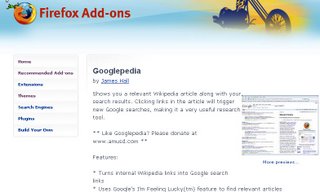 One that I heard about the other day is a little add on called Googlepedia. When you search for something in Google, the add on will also search for the equivalent in Wikipedia and produce it in a split screen. You can click on links within the wikipedia article to create a new Google search as well.
Really cool.
Besides some of the great podcasts that are done by educators such as Chris Betcher who produces The Virtual Staffroom podcast and Dan Schmidt who produces the KidCast podcast, there are also other more general podcasts that inform about more general things.
The one I have found really useful for just finding out about new things coming out on the web is one called Inside the Net. These podcasts have introduced me to things like Delicious, Flickr, wikis, Bloglines and RSS. Each week they seem to come up with something new on the web to talk about. All of which have added a new dimension to my teaching practice.
Another great thing was the introduction to Firefox (which I use as my browser all the time now) and all the cool add ons that you can get from Mozilla.
 One that I heard about the other day is a little add on called Googlepedia. When you search for something in Google, the add on will also search for the equivalent in Wikipedia and produce it in a split screen. You can click on links within the wikipedia article to create a new Google search as well.
Really cool.
Subscribe to:
Posts (Atom)
 Flickr/annieb3525
 Facebook/Anne Baird
 Twitter/annieb3525
 Del.icio.us/annieb3525
 Skype/annieb3525
 AIM/im01annebaird
 GMail/Anne Baird
 coComment/annieb3525
 Technorati/annieb3525
 TeachingwithTechnology/annieb3525


 Posts
Posts

