Showing posts with label blogs. Show all posts
Showing posts with label blogs. Show all posts
Tuesday, November 11, 2008
He's right next door
Tonight as I have been working I have been chatting on Skype at the same time with an amazing young teacher who teaches in another small country school only about 30 minutes drive away from where I teach. Given that there are many times where I look to find other like minded teachers who are using technology in country schools it is so refreshing to see that mrrobbo is close by and is inspirational in the things that he is doing with his students. So tonight I have checked out a wiki that he has created http://h311oe.wikispaces.com/with his Year 12 Outdoor Education class, listened to a podcast interview that he did with a Canadian teacher Rod Lucier of Clever Sheep blog fame and checked out a couple of new sites (for me at least) http://woices.com/ and http://qik.com which both look really interesting when combined with mobile phone technologies. All in all a very inspirational and fascinating chat with a young teacher who is just starting out on his teaching career. I would happily be in his class.


Sunday, July 20, 2008
What does it take to join the Web2.0 education community ?
On Friday night, I spent about three hours with a teacher from a neighbouring school who asked me to help her set up a class blog and individual blogs for her students. I feel really excited for her as she walked away feeling on top of the moon and so excited about the possibilities. It made me think about what it was that made the encounter so successful and why I think that she will continue with her students on this exciting and new journey.
Here are the reasons why I think it worked.
1. Consider firstly what you want to achieve.
When Susan contacted me to help her we first had an email conversation and discussed what she wanted to achieve with her students. Initially it was for her students to publish their poetry. She wanted them to have an audience and to feel that they were doing more with their poetry than just writing them for themselves and their teacher.
2. Consider what is available on the web to achieve that goal.
We discussed the different tools she might use and I shared with her my thoughts about some simple tools that she might use.
If she wanted her students to create a website where they could all write and publish to the one space with equal publishing rights; where she and the students could see what each person contributed; where all entires were date stamped; where others could contribute via a forum or discussion, then she might choose a wiki.
If she wanted the students to be a bit more reflective; write in a more linear way; have others comment to a particular entry or post, the she might choose a blog.
If she wanted each student to have their own page, have students join interest groups within a safe environment, create forums for discussion then she might choose a ning.
3. Check out other examples.
In the week before we got together I sent Susan some examples of how I have used blogs and wikis (didn't consider nings at this point) and also a few other examples of great blogs and wikis that I have seem recently so that she could be a little more informed about the way they are being used all over the world . I tried to make sure that the ones I sent her were active and really good educationally sound example. Personally I want to set the bar high and try to encourage educators to not only think about using online tools but ensure that in their design they are challenging our students to use higher order thinking skills and skills that we know they will have to have to function in the 21stC.
4. Consider what network you want to use.
I suggested to Susan that she use Global Teacher for her own blog and Global Student for her class and student blogs. Mainly because this network is the research brain child of the Victorian Education Channel and the School Libarary Association of Victoria. They manage and provide quality online resources for Victorian teachers and students. This environment has been created to provide a supported online environment, or digital playground, for teachers to explore weblogging and then introduce it to their students.
It's a fantastic environment for teachers just starting out on the blogging journey as there is a great support network as well as excellent examples of how teachers and students are creating and publishing through their blogs.
5. Consider how you are going to set up a support network and learn how to create and manage your project.
Susan settled on creating a class blog and individual blogs for her students as they suited the purpose of the activity. So we sat down together and worked through the process by firstly setting up a class blog in and one student blog.
In our three hours these are some of the things we did:
She wrote one post on the class blog
she changed the design
we added one comment so that she could experience the moderation of comments
we added a couple of widgets to the class blog
we talked about what she does as an administrator and made a decision about the settings for the students. She decided on contributors at this stage.
She is now going to set up her class using the user and blog creator.
6. Consider how you are going to remain active
Susan has also decided to set up her own personal blog in globalteachers and we talked about what she would do with that blog. She wants to be able to reflect and discuss with colleagues her teaching experiences as she is in a small school and the only Grade 5/6 teacher. She is so excited about is all and I feel certain that she is going to ‘fly’.
She is looking at it from the point of view of her students and her own professional practice.
While we worked together over the three hours we also talked about and visited a few other places on the web that would help her in her professional journey.
I shared with her the tools that I now use in my daily professional life that keep me informed and connected in such a powerful way.
Twitter, nings, (Classroom 2.0 is a great place to start) RSS feeds, wikis, (I love wikispaces for teachers) teachertube, Diigo, vokis, Animoto education are but a few of the places she is going to hopefully visit and learn from over the next few weeks
I have been actively working and learning in this environment since around 2007 and I still get really excited about all the possibilities and connections that I make every day I came away from our meeting feeling very excited for her.
I think she has caught the bug :)
Here are the reasons why I think it worked.
1. Consider firstly what you want to achieve.
When Susan contacted me to help her we first had an email conversation and discussed what she wanted to achieve with her students. Initially it was for her students to publish their poetry. She wanted them to have an audience and to feel that they were doing more with their poetry than just writing them for themselves and their teacher.
2. Consider what is available on the web to achieve that goal.
We discussed the different tools she might use and I shared with her my thoughts about some simple tools that she might use.
If she wanted her students to create a website where they could all write and publish to the one space with equal publishing rights; where she and the students could see what each person contributed; where all entires were date stamped; where others could contribute via a forum or discussion, then she might choose a wiki.
If she wanted the students to be a bit more reflective; write in a more linear way; have others comment to a particular entry or post, the she might choose a blog.
If she wanted each student to have their own page, have students join interest groups within a safe environment, create forums for discussion then she might choose a ning.
3. Check out other examples.
In the week before we got together I sent Susan some examples of how I have used blogs and wikis (didn't consider nings at this point) and also a few other examples of great blogs and wikis that I have seem recently so that she could be a little more informed about the way they are being used all over the world . I tried to make sure that the ones I sent her were active and really good educationally sound example. Personally I want to set the bar high and try to encourage educators to not only think about using online tools but ensure that in their design they are challenging our students to use higher order thinking skills and skills that we know they will have to have to function in the 21stC.
4. Consider what network you want to use.
I suggested to Susan that she use Global Teacher for her own blog and Global Student for her class and student blogs. Mainly because this network is the research brain child of the Victorian Education Channel and the School Libarary Association of Victoria. They manage and provide quality online resources for Victorian teachers and students. This environment has been created to provide a supported online environment, or digital playground, for teachers to explore weblogging and then introduce it to their students.
It's a fantastic environment for teachers just starting out on the blogging journey as there is a great support network as well as excellent examples of how teachers and students are creating and publishing through their blogs.
5. Consider how you are going to set up a support network and learn how to create and manage your project.
Susan settled on creating a class blog and individual blogs for her students as they suited the purpose of the activity. So we sat down together and worked through the process by firstly setting up a class blog in and one student blog.
In our three hours these are some of the things we did:
She wrote one post on the class blog
she changed the design
we added one comment so that she could experience the moderation of comments
we added a couple of widgets to the class blog
we talked about what she does as an administrator and made a decision about the settings for the students. She decided on contributors at this stage.
She is now going to set up her class using the user and blog creator.
6. Consider how you are going to remain active
Susan has also decided to set up her own personal blog in globalteachers and we talked about what she would do with that blog. She wants to be able to reflect and discuss with colleagues her teaching experiences as she is in a small school and the only Grade 5/6 teacher. She is so excited about is all and I feel certain that she is going to ‘fly’.
She is looking at it from the point of view of her students and her own professional practice.
While we worked together over the three hours we also talked about and visited a few other places on the web that would help her in her professional journey.
I shared with her the tools that I now use in my daily professional life that keep me informed and connected in such a powerful way.
Twitter, nings, (Classroom 2.0 is a great place to start) RSS feeds, wikis, (I love wikispaces for teachers) teachertube, Diigo, vokis, Animoto education are but a few of the places she is going to hopefully visit and learn from over the next few weeks
I have been actively working and learning in this environment since around 2007 and I still get really excited about all the possibilities and connections that I make every day I came away from our meeting feeling very excited for her.
I think she has caught the bug :)
Monday, July 07, 2008
How do we keep up with the learning
I've just been reading an article, Fast Learners in the Information Age that was posted to Twitter from one of my twitter friends. The article discusses changes that are taking place in Australian workforce in terms of the way we learn and collaborate with each other. The use of online applications particularly those that could fit under the umbrella of social networking are being considered in some sectors as almost essential tools for those groups that manage and train vast numbers of personnel. Unfortunately in the education sector, I don't think we are up to that stage yet although I think we should be. The percentage of teachers who maintain a sense of professional development via the web is increasing but sadly I don't believe that it's at the tipping point yet. A lot more work has to be done in terms of recognising the power and potential of these tools not so much at the change management level but at the practitioner level, the teacher level. Until that happens, I think all we can do is continue to sing the praises, the advantages, the power of this environment to our colleagues and hopefully that will contribute in some small way to the change that has to happen. For me the power of learning and improving my own professional practice comes through the use of social networking communities and tools such as Twitter, blogs, wiki, Ning, Diigo and so many more. But it takes a certain enthusiasm, commitment, dedication and faith in its value to keep participating, working and learning in and from this environment. I have no doubt that as time goes on we will embrace the power of this more and more. It's up to us who are immersed in it to continue to sing it's praises and spread the word.
Blogged with the Flock Browser
Tuesday, January 29, 2008
Learning more about blogging
I came across a new and I think very practical blog written by Sue Waters. Sue is already a reknowned blogger who blogs on Mobile Technology in TAFE. I must admit that I come to Sue's Mobile Technology blog as a late comer but I can already see that it is yet another blog that I will continue to subscribe to. I think I'm going to have to start learning how to read in my sleep!
But I digress. Sue now writes two blogs having just begun a new blog for edublogs. Edublogs is James Farmer's well known and acclaimed site for those in education who love to blog. Sue's new blog is one that she is writing for edublogs called The Edublogger. It seems that Sue has already contemplated the challenge of writing two blogs that might easily be read by the same people. So she has decided that "The Edublogger's posts will be “How To” tips and her Mobile Technology in TAFE will "work through topics on using blogs in an educational context."
Already Sue has created posts on How to create Hyperlinks using HTML, How to add a photo to your sidebar, Adding Widgets to your blog and Tips for doing a blog makeover.
For a while now I have been toying with the idea of taking my blog over to edublogs. Mainly I guess because firstly it's created by a fellow Aussie in James Farmer. And secondly because it is specifically designed for educators. Maybe Sue's posts might just provide the impetus to move to a new home...
But I digress. Sue now writes two blogs having just begun a new blog for edublogs. Edublogs is James Farmer's well known and acclaimed site for those in education who love to blog. Sue's new blog is one that she is writing for edublogs called The Edublogger. It seems that Sue has already contemplated the challenge of writing two blogs that might easily be read by the same people. So she has decided that "The Edublogger's posts will be “How To” tips and her Mobile Technology in TAFE will "work through topics on using blogs in an educational context."
Already Sue has created posts on How to create Hyperlinks using HTML, How to add a photo to your sidebar, Adding Widgets to your blog and Tips for doing a blog makeover.
For a while now I have been toying with the idea of taking my blog over to edublogs. Mainly I guess because firstly it's created by a fellow Aussie in James Farmer. And secondly because it is specifically designed for educators. Maybe Sue's posts might just provide the impetus to move to a new home...
Wednesday, November 28, 2007
John Pearce- an inspirational teacher
I attended the VITTA conference last week and if I say so myself I managed to choose some pretty amazing and inspirational teachers to listen to. One session that I really enjoyed was presented by John Pearce, a primary teacher in a Victorian school. Earlier in the day John had been presented with the VITTA Primary Teacher of the year. You know the deal, they start to read out the things that the winner has done and I must admit as soon as I heard things like this person has created some wonderful science resources, keeps a number of blogs, has his students create blogs and wikis for sound educational purposes that are recognised all over the world...well you know the drill. I reckon by the first sentence I knew it was John who was the winner. and it's well deserved. So I was very happy to go along and listen and watch him show lots of inspirational examples of how he has used these web 2.0 tools to engage and inspire his students. John very generously provided us all with a CD with many of his resources and ideas. I haven't yet had time to check it out, but it's on my list of things to do. There were a couple of little gems from John that I'd like to share. In explaining RSS feeds John used the analogy of a postman. In 'the olden days' we used to have to go down to the post office to get our mail. (without RSS feeds we have to go to the website, blog or wiki to get any updates.) And then they employed postmen. Now people didn't have to go to the post office. Their mail was delivered to them by the postman. (RSS feeds are the online equivalent to the postman) A cool analogy that is simple and easy to explain to teachers and kids alike.
Another great little gem was when John was talking about online etiquette and safety. He talked about the fact that he always posts the code of practice on the student blogs before they begin their online activities. He said that he used the "grandma rule" which is the idea that students should only post things that they would be happy to have their grandma read. How cute but cleverly in it's simplicity and clarity.
Finally the last gem I'll add here is that John uses RSS feeds for all his students so that he can be informed when students make changes to their blogs. This inspired me to do this with our students wikis. There were lots more fantastic ideas from John...thanks for sharing. Perhaps when I get to the CD I'll be able to add more.
Another great little gem was when John was talking about online etiquette and safety. He talked about the fact that he always posts the code of practice on the student blogs before they begin their online activities. He said that he used the "grandma rule" which is the idea that students should only post things that they would be happy to have their grandma read. How cute but cleverly in it's simplicity and clarity.
Finally the last gem I'll add here is that John uses RSS feeds for all his students so that he can be informed when students make changes to their blogs. This inspired me to do this with our students wikis. There were lots more fantastic ideas from John...thanks for sharing. Perhaps when I get to the CD I'll be able to add more.
Sunday, November 18, 2007
Arthus-the new generation of 14 Year Old?
Arthus is an amazing 14 year old student from who blogs. I came across a post about Arthus on a blog called the Infinite Thinking machine, an educational blog that is contributed to by some very emminent educational commentators.
In this post titled "A 14 year old talked Educational Technology- Steve Hargadon reflects on the type of 14 year old Arthus is and how he uses and moves in the online world. His suggestion is that Arthus is not your typical 14 year old and I probably agree with that. I'm not suggesting that other 14 year olds are not as articulate and maybe as prolific as Arthus as I can think of a few that I teach at my school but none of them, as far as I know keep a blog or contribute to the online educational debate. I stress though " as far as I know". To be perfectly honest I would have no idea what type of online presence our 14 years olds have at our school. I do know that a few of them have bebo, facebook or myspace pages but I don't know what their online monikers are and I don't have any online dialogue with them. But I digress.
What really fascinated me about this post was that in the Notes section Steve wrote about where Arthus started his online journey and even more interesting was the habits and behaviours of Arthus as he interacts on the web. Much of what is listed here is a very mature response to some of the challenges and fears that educators and educational institutions face. But what is even more interesting are the 40 odd comments that have arisen out of this post. You must check it out as Arthus participates and again represents himself very powerfully in a new and exciting world of equality- he gives as much as he gets. An example I think, of the (educational) world continuing to flatten- I'm not sure that this conversation would happen in the classroom where often unfortunately the teacher has all the power .
In this post titled "A 14 year old talked Educational Technology- Steve Hargadon reflects on the type of 14 year old Arthus is and how he uses and moves in the online world. His suggestion is that Arthus is not your typical 14 year old and I probably agree with that. I'm not suggesting that other 14 year olds are not as articulate and maybe as prolific as Arthus as I can think of a few that I teach at my school but none of them, as far as I know keep a blog or contribute to the online educational debate. I stress though " as far as I know". To be perfectly honest I would have no idea what type of online presence our 14 years olds have at our school. I do know that a few of them have bebo, facebook or myspace pages but I don't know what their online monikers are and I don't have any online dialogue with them. But I digress.
What really fascinated me about this post was that in the Notes section Steve wrote about where Arthus started his online journey and even more interesting was the habits and behaviours of Arthus as he interacts on the web. Much of what is listed here is a very mature response to some of the challenges and fears that educators and educational institutions face. But what is even more interesting are the 40 odd comments that have arisen out of this post. You must check it out as Arthus participates and again represents himself very powerfully in a new and exciting world of equality- he gives as much as he gets. An example I think, of the (educational) world continuing to flatten- I'm not sure that this conversation would happen in the classroom where often unfortunately the teacher has all the power .
Blogged with Flock
Wednesday, November 07, 2007
Creating a Learning Wiki
I love wikis. Mainly because they provide an opportunity for anyone or everyone to create an online presence to share, to provoke, to describe, to collaborate. Wikis as we know simply enable anyone and everyone to create content online using easily understandable tools. Many of our P-12 schools are taking advantage of the opportunities for "collaborative construction" that wikis provide. But I love the fact that we can also use them for whatever we need to create online. At the moment I am working on my presentation wiki , Teaching-with-Technology, in preparation for a couple of conferences I am presenting at over the next couple of weeks. My aim is to have all the information that I need and much more on the wiki so that people who attend my workshop will have a type of one stop shop where they can get all of the information that they need. It will contain links for both teachers and students to sites that help them to be organised, collaborate with each other, learn from others, see examples of Web 2.0 being used in the classroom and much more.
Over the next couple of weeks I will continue to build on it and I would love some feedback or suggestions.
Over the next couple of weeks I will continue to build on it and I would love some feedback or suggestions.
Sunday, September 09, 2007
Adding images on the web
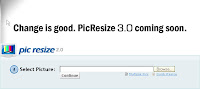
A few weeks ago I was reading Darrel Branson's blog The ICT Guy and he mentioned that he uses pic resize to resize images that are to be uploaded to blogs and wikis. In the past I have (and still do) teach my students how to quickly optimise images in Fireworks or Paintshop Pro. But pic resize will now also become an additional option for our students to use when they quickly want to resize something to up load to the web. It's so easy. All you do is select the picture you want to resize, choose quick resize, go through the options, download the image (you have to download it within 20 minutes or you will lose it) and the upload to your blog or wiki. Cool !!
Thursday, September 06, 2007
Recently I was in a Grade 3/4 classroom discussing the possibility of setting up some new blogs and adding them to the class wiki. As part of the activity we decided to explore the blogs of other students in other schools. My purpose was to have students consider why we blog and to hopefully see their value. One of the student blogs we looked at used an avatar that moved and spoke and looked pretty cool. Thinking I would be teaching something new I asked if the students knew what an avatar was and to my surprise some students not only knew what they were but had created them. A little further probing revealed that they had been taught how to create an avatar by older siblings. It made me wonder what else they knew how to do (many of them knew about myspace and youtube) and once again it forced me to consider the challenge we all have as teachers to keep up with the changes that are occurring in our students lives even as we read this article.
Talk about the Being green activity. Planning with skype
Subscribe to:
Posts (Atom)
 Flickr/annieb3525
 Facebook/Anne Baird
 Twitter/annieb3525
 Del.icio.us/annieb3525
 Skype/annieb3525
 AIM/im01annebaird
 GMail/Anne Baird
 coComment/annieb3525
 Technorati/annieb3525
 TeachingwithTechnology/annieb3525


 Posts
Posts

